
When it breaks, they search and book fast
AC repair searches peak in late summer and furnace repair in the fall, and emergency searches jump in July. The repair page shows your hours, your service area and a way to book in under a minute.
Websites for heating and cooling companies that fill the schedule with repair calls in the busy months and replacement jobs in the quiet ones. A page for each system you work on, pages for the problems homeowners type into Google, and a booking form that works at 10 at night.
PageSpeed Insights on the home pages of the 7 sites we link as our work, measured November 2026, the median of three runs each.
An HVAC company has two kinds of customer. One has an AC that stopped cooling this afternoon and will book whoever answers first. The other is replacing a furnace or adding a heat pump, and will read for weeks before asking for a quote. A good HVAC site gives each of them its own path from the home page.
AC repair searches peak in late summer and furnace repair in the fall, and emergency searches jump in July. The repair page shows your hours, your service area and a way to book in under a minute.
AC not cooling, furnace short cycling, heat pump blowing cold air. A page for each common problem explains what it usually is, what is safe to check, and when to book a visit.
Heat pumps and ductless mini splits are researched most in January. Pages for each system answer the questions they ask: which fits the house, what the efficiency ratings mean, and what installation involves.
Your license number where your state or city licenses HVAC work, the EPA Section 608 certification your technicians need to handle refrigerant, and the brands you install and service, where a homeowner can see them.
AC repair tonight, a furnace replacement this fall and a mini split for the garage are three searches from three different homeowners. A single list of everything you do answers none of them well.
A homeowner who finds you at night, or at work, fills in a form or books a slot. If the site only shows a number, some will book with the company whose site lets them.
A home page that still leads with AC tune-ups in winter tells a buyer the site is not looked after. We build the home page so the lead service can switch with the season in a small edit.
Manufacturer logos and nothing on how to choose a system. The buyer goes to a site that explains it, and calls that company.
Central AC, furnaces, heat pumps, boilers and mini splits, each with what you fix, your hours and a booking form.
One per system you install, with how to choose, what efficiency ratings such as SEER2, HSPF2 and AFUE mean for the homeowner, and what the install day looks like.
Written for the searches homeowners make when something goes wrong, each ending with a way to book a visit.
System, problem, address or ZIP code and a preferred time. Requests arrive with what dispatch needs, or go straight into the booking tool you already use.
What each visit covers and when, so members know what they are paying for and new customers can join from the page.
A page on the financing you work with and how to apply, linked from every replacement page.
Each repair, replacement and problem page goes live with its title, heading, schema and internal links in place, because the people building it also do SEO, and your service area is on the pages and in your Google Business Profile. That gives your AC repair page its chance with the homeowner searching on a hot afternoon, and the booking form lets them book before they leave the page.
For the search work after launch, see SEO for HVAC contractors.
On top of the speed, accessibility, SEO, hosting handover and training that come with every build.
A demo we drew for an HVAC company, with no real business in it: air drifts from a ceiling vent, and the thermostat warms or cools as the pointer moves. Scenes like this load after the words and the booking form.
AC out? Book a repair.
Air drifts out of a ceiling vent. Move the pointer left for cooler air and right for warmer, and the thermostat reads it out in Fahrenheit.
Sites for a plumber, a solar installer and a pest control company, each built around booking a technician to the home. Open them on your phone.

Open the live site of the pest control company (opens in a new tab)
A home-services site for a pest control company: a page for each treatment, a library of pest guides and a droppings identifier.

Open the live site of the solar installer (opens in a new tab)
A site for a solar panel installer, built around a calculator that sizes a system from the customer’s own electricity bill.
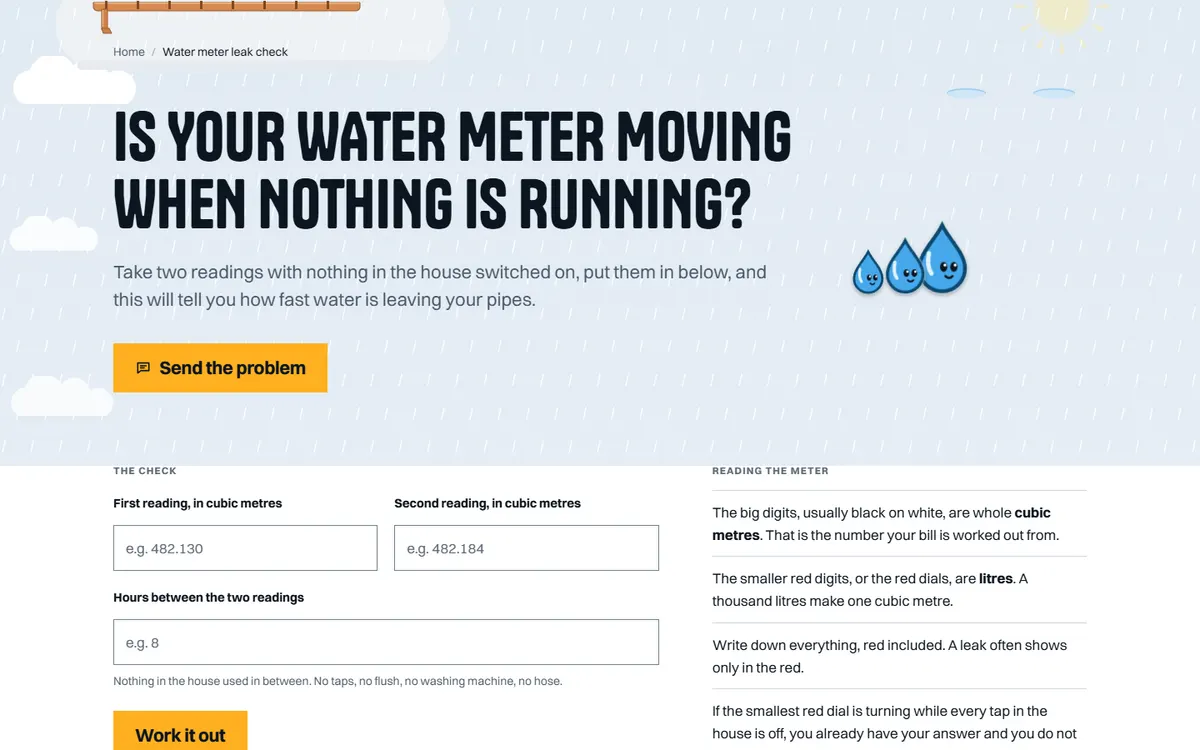
Open the live site of the plumbing business (opens in a new tab)
A home-services site for a plumber open seven days, with a water meter leak check customers run themselves.
Six stages on every site, whichever platform it is built on. The scope and the quote are agreed in writing after the first call, before any design starts.
01
What the site has to do, who it is for and what exists today. If there is a site already, we read its Search Console first, because the pages earning impressions decide what the new one must keep.
02
Every page listed with the search it answers and the action it asks for. On a redesign, every old URL is written beside its new home. You sign the map off before design starts.
03
Pages designed with your actual words and pictures, at phone width first. You review in the browser, on a staging address search engines are told to ignore.
04
Titles, descriptions, headings, schema and internal links are written as each page is built, so nothing is added at the end by somebody who never saw the page map.
05
Speed measured on a phone, every page at 320px wide and at 200 percent text, keyboard and screen reader checks, forms sent and received, redirects tested against the new build.
06
The switch, then Search Console read daily for two weeks. The domain, hosting and logins stay in your name, with a written note of how the site is built and a recorded session on editing it.
Speed
Measured in PageSpeed Insights on a phone before launch. Images sized for the slots they fill, fonts that do not block the page, no script a page does not use.
Accessibility
Text contrast, keyboard use, visible focus, alt text written for each picture, 44px tap targets on phones, and every page readable at 200 percent text.
SEO foundations
One title, description and H1 per page, schema, a sitemap that matches the site, clean URLs, redirects from every old address, and Search Console set up in your name.
Hosting handover
The domain, the hosting and every login in your name. We set the site up on your host, recommend one, or host it for you; either way you can move it.
Training
A recorded call showing whoever edits the site how to change a page, add a post and swap a picture, and a short written guide to keep beside it.
Two weeks after launch
Search Console, forms and errors checked daily for the first two weeks, and anything the launch broke fixed straight away.
It depends on how many systems and service areas you want pages for, and whether booking connects to software you already use. We send a written quote once we know the scope.
Often, yes. Most field service tools offer a booking widget or a form link we can place on the site. If yours does not, the form sends each request to your inbox with the system, the problem and the address.
Yes. The home page is built so the lead service can switch between cooling and heating with a small edit. We can make the switch for you, or the site can be built on a platform with a content editor, such as WordPress, so your office can do it.
We do, from the searches homeowners make and the answers your technicians give. You review each one before it goes live, so nothing on the site tells a homeowner to do something unsafe.
Many of those searches end on the map, so the site and your Google Business Profile are matched, and each repair page names the area you cover. Your reviews and the other HVAC companies near you matter as much as the site, and we go through what that means for your area on the call.
Your company. The domain, the hosting account and the logins are in its name, so you can change who looks after the site whenever you like.
A 30-minute call in your business hours. Tell us what work you want more of and where, and we will tell you what we would do first and what it involves. Prefer to write? Use the form, with or without a website, and the Passieon Team will reply within two business days.
Message us
Ask anything about your site or where your inquiries are going. It goes straight to a person, not a bot. Leave an email and you get a reply.